LinkMatch Integration Tool: Streamline LinkedIn Productivity & CRM Sync
In modern sales, recruitment, and business development, maintaining an accurate and up-to-date customer relationship management (CRM) system or applicant tracking system (ATS) is critical. However, manually copying profile details, contact information, work history, and communication logs from LinkedIn into database software is often tedious and time-consuming. LinkMatch offers a specialized software solution built directly into your web browser to eliminate manual data entry. By linking LinkedIn seamlessly with popular platforms like HubSpot, Zoho, Pipedrive, Greenhouse, and Salesforce, this integration tool helps professionals maintain immaculate records while saving hours of repetitive administrative tasks every week.
Get the latest offers from the store.
Overview of LinkMatch: Seamless LinkedIn to CRM Synchronization
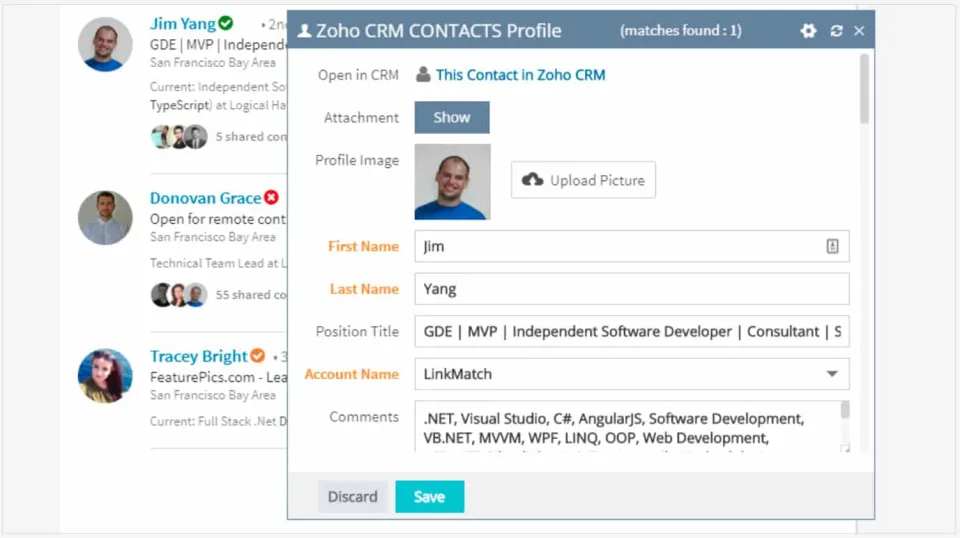
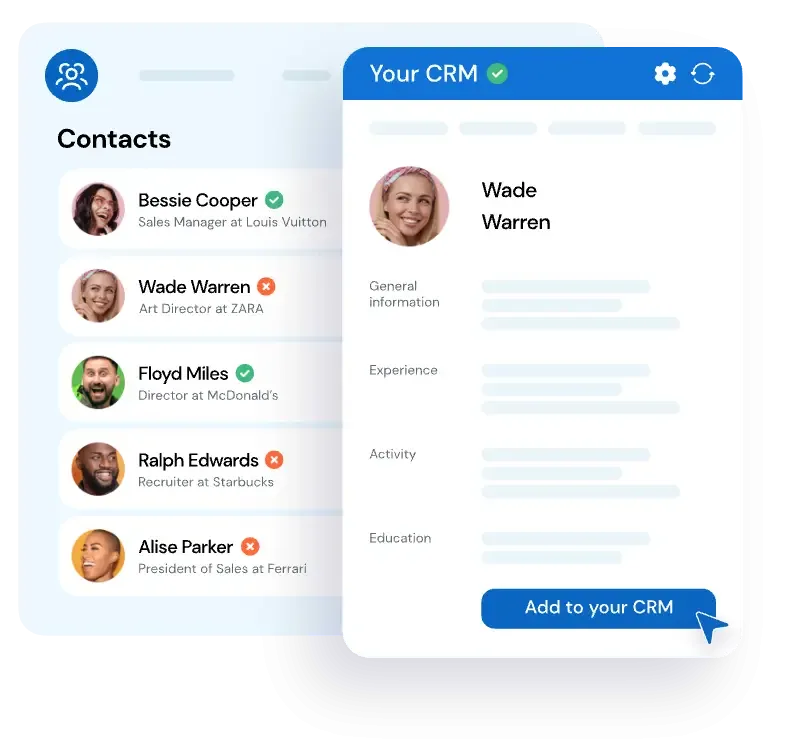
LinkMatch functions as a lightweight browser extension that connects LinkedIn and LinkedIn Recruiter directly to your primary business CRM or ATS software. Designed for sales representatives, talent acquisition professionals, account executives, and business developers, LinkMatch instantly checks whether a profile you view on LinkedIn already exists inside your company database. If the prospect or candidate is present, green indicators inform you immediately, displaying real-time system details right inside your browser view.
If the person is not yet listed in your platform, LinkMatch enables you to create a new profile with a single click. The tool automatically maps profile fields—such as full name, job title, company name, phone numbers, location, and work history— directly into corresponding fields within your target system. This synchronization eliminates the need to switch tabs continuously, copy and paste text strings, or risk human error during data entry workflows.
Key Features and Supported Platform Integrations
The versatility of LinkMatch comes from its native-like interface and broad compatibility with industry-leading business platforms. Whether your team relies on pipeline management tools for sales outreach or complex tracking platforms for recruiting, LinkMatch adapts to your existing software setup smoothly.
How LinkMatch Improves Sales and Recruitment Workflows
Time management is vital for sales teams and recruiters who depend on daily outreach volume. Manual administrative workload can consume a significant portion of an representative's work week. By integrating your business tools directly into your primary web browser interface, LinkMatch shifts focus back toward relationship building and closing deals.
For sales professionals using software like Pipedrive or HubSpot, lead enrichment becomes an effortless background task. When prospecting prospective decision-makers, account representatives can verify whether a company or key executive is actively being managed by a colleague. This prevents duplicate outreach, streamlines territory allocation, and ensures accurate account history logs.
Available Coupons
- Free Trial Available — Test full multichannel sync, pipeline management, and customer messaging workflows risk-free for 14 days with guided onboarding.
For recruitment agencies and corporate talent teams utilizing applicant tracking tools like Greenhouse, candidate pipeline development becomes vastly faster. Talent managers can review LinkedIn profiles, check historical notes from previous application cycles, update candidate statuses, and assign candidates to specific active job requisitions instantly from the web browser interface.
Pros and Cons of LinkMatch
Understanding the strengths and operational requirements of LinkMatch helps teams evaluate how it fits within their existing productivity technology stack.
Advantages
Potential Drawbacks
Getting Started with LinkMatch
Implementing LinkMatch within your daily workflow requires minimal technical setup. Teams can get up and running in just a few simple steps:
- Select the specific LinkMatch extension corresponding to your organizational CRM or ATS software (e.g., LinkMatch for HubSpot or LinkMatch for Salesforce).
- Install the extension into your web browser and grant authorization to connect securely with your target management system.
- Map your desired fields using the configuration menu to ensure custom data properties sync accurately between applications.
- Open LinkedIn or LinkedIn Recruiter, where visual connection indicators will immediately begin displaying status information on profiles.
- Take advantage of the 14-day trial period to evaluate automated data syncing, candidate mapping, and task management across your daily sales or recruitment outreach.
By transforming how social network data flows into backend management systems, LinkMatch serves as an essential productivity catalyst for modern sales, marketing, and talent acquisition operations.